
Choose a DePIN compute network
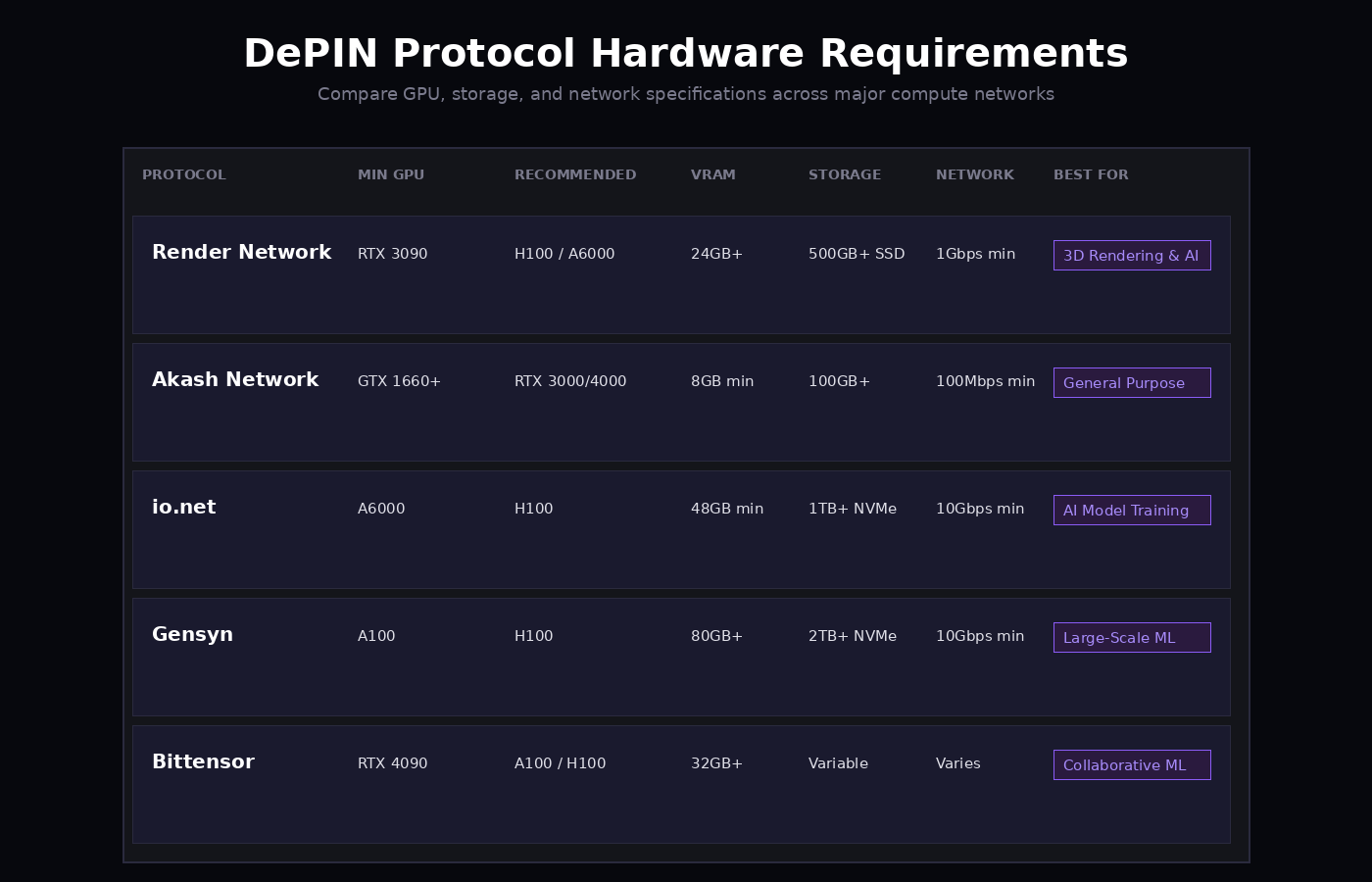
Selecting the right DePIN compute network depends on your hardware capabilities and technical comfort. The landscape includes Render Network, Akash, Io.net, and Gensyn, each offering different payout structures and setup requirements. Render Network remains the leading decentralized GPU rendering platform, while Akash provides a flexible cloud marketplace for various workloads. Io.net aggregates GPU power for AI training, and Gensyn focuses on high-precision, distributed AI computation.
Render Network is ideal for users with high-end NVIDIA GPUs, such as the RTX 4090, who want to participate in rendering tasks. Akash Network offers a more general-purpose platform, allowing you to rent out compute for a wider range of applications. Io.net is designed for those interested in AI model training, requiring robust hardware to handle large datasets. Gensyn targets high-precision AI tasks, appealing to users with specialized technical expertise.

| Network | Hardware | Payout Token | Setup Difficulty |
|---|---|---|---|
| Render Network | NVIDIA RTX 30/40 series | RNDR | Medium |
| Akash Network | Any GPU with 8GB+ VRAM | AKT | Low |
| Io.net | NVIDIA RTX 30/40 series, A100 | IOT | Medium |
| Gensyn | High-end NVIDIA GPUs | GNS | High |
Prepare your hardware and drivers
DePIN networks rely on decentralized compute, but the hardware requirements remain strict. To rent out GPUs effectively in 2026, you need NVIDIA hardware with sufficient VRAM and a stable driver configuration.
1. Verify NVIDIA GPU and VRAM
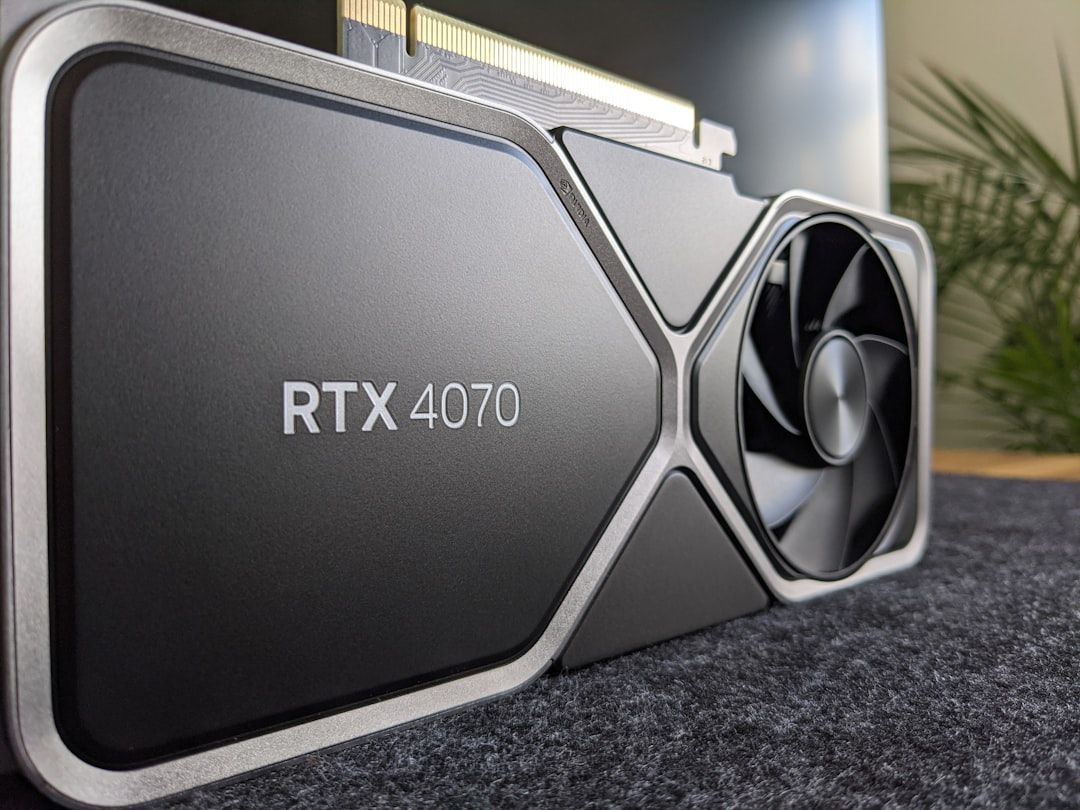
Most DePIN protocols prioritize NVIDIA GPUs due to CUDA compatibility. Ensure your card meets the minimum VRAM threshold, typically 16GB or 24GB, depending on the specific network. Consumer cards like the RTX 3090 or 4090 are common, but enterprise cards may offer better stability for long-term uptime. Check the protocol’s documentation for exact model requirements.
2. Install Official NVIDIA Drivers
Outdated or corrupted drivers cause node failures and lost rewards. Download the latest stable drivers directly from NVIDIA’s official website. Avoid third-party driver managers or beta versions unless explicitly recommended by the DePIN project. After installation, verify the driver version in the NVIDIA Control Panel or via the command line (nvidia-smi).
3. Configure Environment Variables
Set necessary environment variables for CUDA and any specific runtime requirements. This includes ensuring your system paths recognize the GPU libraries. Incorrect configuration often leads to silent failures where the node appears online but processes no tasks. Test your setup with a simple CUDA sample program before joining a network.
4. Ensure Stable Power and Cooling
DePIN nodes run 24/7. Insufficient power supply units (PSUs) or poor cooling lead to thermal throttling and hardware degradation. Use a dedicated PSU for your GPU if possible, and monitor temperatures regularly. Consistent uptime is more valuable than peak performance in decentralized networks.
5. Verify Network Connectivity
DePIN protocols require open ports and low latency. Configure your router to allow inbound connections on the ports specified by the network. Use a wired Ethernet connection instead of Wi-Fi to minimize packet loss. Test your connection using the protocol’s diagnostic tools before deploying your node.
Connect your wallet and verify identity
Before you can rent out your GPU for DePIN, you must establish a secure digital identity. This process involves two critical steps: linking a compatible cryptocurrency wallet and completing Know Your Customer (KYC) verification.
Start by setting up a non-custodial wallet like MetaMask, Rabby, or Trust Wallet. These tools manage your private keys and allow you to interact with blockchain networks. During onboarding, select the blockchain network supported by your chosen DePIN platform (e.g., Ethereum, Solana, or Polygon). Ensure you store your seed phrase securely offline; if lost, your access to your rented GPU rewards will be permanently locked.
Navigate to the platform’s dashboard and locate the "Connect Wallet" button. Most DePIN interfaces will prompt you to sign a message to prove ownership of the wallet address. This signature does not cost gas fees but establishes a verified link between your identity and your computing resources. Once connected, the platform can assign your GPU to specific inference or rendering tasks.
Many established DePIN networks require identity verification to comply with anti-money laundering (AML) laws. You will likely need to upload a government-issued ID and complete a biometric selfie check. This step is mandatory for platforms that distribute rewards in fiat-equivalent tokens or operate through regulated entities. Verification typically takes between 10 minutes to 48 hours depending on the provider’s current backlog.
Once your wallet is linked and your identity is verified, your node is ready to receive tasks. Ensure your wallet holds a small amount of the native token for gas fees if the platform requires transaction signing for task acceptance.
Install the node software
Setting up a GPU node for a DePIN network requires installing the specific client software that manages your hardware. This client handles the connection to the network, monitors your GPU health, and proves you are performing the required compute tasks.

Navigate to the official documentation or GitHub repository for your chosen DePIN project. Avoid third-party download mirrors, as modified binaries can compromise your wallet keys. Look for the latest stable release tagged for your operating system (Linux is preferred for stability, though Windows and macOS are often supported).
Before running the installer, ensure your system meets the baseline requirements. This includes having the correct GPU drivers installed (NVIDIA CUDA toolkit for NVIDIA cards) and sufficient disk space for the node’s data directory. Most clients require a dedicated folder to store configuration files and temporary compute data.
Most DePIN nodes require specific network configurations to accept incoming connections from requesters. This often involves opening specific ports on your router or firewall. Check the project’s documentation for the exact port numbers and protocols (TCP/UDP) required. Failure to configure this correctly is the most common reason nodes fail to earn rewards.
Run the initialization command to generate your unique node identity and wallet address. This step creates the cryptographic keys that link your physical hardware to your blockchain wallet. Securely back up your private keys or mnemonic phrase; if you lose them, you cannot access the rewards earned by this node.
Launch the node client and monitor the logs. Look for status messages indicating the node has successfully connected to the network and registered its hardware capabilities. You can typically verify this by checking the project’s block explorer or dashboard using your node ID.
Monitor earnings and uptime
Tracking your GPU node’s performance is the difference between consistent income and silent failures. In DePIN, you are paid for verified compute, not just for having hardware running. If your node goes offline without detection, you lose payouts and potentially face slashing penalties depending on the network’s smart contract rules.
Verify your dashboard metrics
Most DePIN platforms provide a web dashboard or CLI tool to monitor node health. You need to verify three specific metrics daily:
- Uptime: Ensure your node is connected to the network for at least 95-99% of the time. Intermittent drops can trigger disqualification.
- Task Completion Rate: Check if your assigned compute tasks are completing successfully. A high failure rate suggests driver issues or thermal throttling.
- Earnings Accrual: Confirm that rewards are accruing in real-time. If earnings stall, your node may have been marked as "offline" by the protocol.
Troubleshoot common downtime causes
Downtime is rarely random. It usually stems from one of three hardware or software bottlenecks:
- Thermal Throttling: High-end GPUs like the RTX 4090 generate significant heat. If temperatures exceed 85°C, the GPU will throttle performance, causing task failures. Ensure adequate airflow or consider active cooling solutions.
- Driver Conflicts: Outdated or incompatible GPU drivers often cause crashes during heavy compute loads. Keep your NVIDIA drivers updated to the latest stable version recommended by the DePIN project.
- Network Instability: A dropped internet connection is the most common cause of unexpected offline status. Use a wired Ethernet connection instead of Wi-Fi to maintain a stable link.
Optimize for consistent payouts
Consistency is key to maximizing earnings. According to industry estimates, a well-maintained high-end GPU node can earn between $3.00 and $7.00 per day, but this assumes near-perfect uptime. To protect this income:
- Set up automated alerts for node status changes using your platform’s notification settings.
- Perform weekly hardware checks, cleaning dust from fans and checking cable connections.
- Rotate tasks if the platform allows, ensuring you are not assigned tasks that exceed your hardware’s capacity.
Common DePIN setup mistakes
Even with powerful hardware, small configuration errors can disqualify your node or slash earnings. Network instability and driver mismatches are the most frequent causes of downtime.
Internet stability matters more than raw speed. DePIN protocols require consistent latency, not just high bandwidth. Packet loss causes missed validation windows, which nodes interpret as inactivity. Use a wired Ethernet connection and verify your connection stability using tools like ping or mtr before launching your node.
Driver versions must match protocol requirements. Running an outdated NVIDIA driver or an incompatible CUDA version is a common pitfall. Many DePIN projects require specific driver branches to ensure secure enclave functionality. Check the official documentation for your chosen platform—such as Render, Akash, or io.net—for the exact driver matrix. Mismatched drivers often result in silent failures where the node appears online but performs no useful work.
Resource allocation limits. Do not allocate 100% of your GPU memory to the container. Reserve memory for the host OS and monitoring tools. Overcommitting resources leads to OOM (Out of Memory) kills, restarting your node repeatedly and interrupting uptime bonuses.
No comments yet. Be the first to share your thoughts!